Compare
Top 5 Open-Source Headless CMS Platforms for Global Teams in 2026
Compare the top 5 open-source headless CMS platforms in 2026 — Localess, Strapi, Directus, Payload CMS, and Ghost — with honest trade-offs for multilingual teams building global products.
If your product ships to more than one market, your CMS choice is quietly one of the most consequential infrastructure decisions you'll make this year. A platform that handles content well but buries translation management three API calls deep adds weeks of engineering overhead per locale — and that cost compounds every time you add a language.
This guide evaluates five open-source headless CMS platforms through the lens of global teams: engineering effort to set up, native multilingual support, infrastructure fit, and long-term maintainability. No vague scores. Just what each platform does well, where it falls short, and who it's actually built for.
What Makes a Great Open-Source Headless CMS in 2026
Before ranking platforms, here are the six criteria that separate a solid CMS from one that creates technical debt:
- Native i18n support — Translation management built into the data model, not bolted on via plugin. Locale routing, fallback chains, and translation status are first-class concepts, not workarounds.
- API-first design — REST and/or GraphQL with predictable schemas, versioned APIs, and SDK support. The CMS should disappear behind your frontend.
- Infrastructure portability — Runs on your chosen cloud or on-prem without locking you into a proprietary hosting layer.
- Content modelling flexibility — Reusable components, nested structures, and relationships without requiring code changes for every new content type.
- Developer experience — TypeScript types, local development parity, and a content preview workflow that editors can use without filing a ticket.
- Access control — Role-based permissions granular enough for editorial workflows: draft, review, and publish as separate gates.
Each platform below is rated on all six.
1. Localess — Best for Multilingual Teams on Google Cloud
Localess is an open-source headless CMS built specifically for teams that treat localisation as a product requirement, not an afterthought. It runs on Google Cloud (Firebase App Hosting, Firestore, Cloud Functions) and ships i18n as a core data primitive — not a plugin.
How it works
Where most CMS platforms treat translation as a layer on top of a content model, Localess inverts this: every content entry is locale-aware by default. You define a schema once; Localess generates the translation matrix across all your configured locales. Editorial teams see a side-by-side translation editor; engineers query content by locale through a clean REST API with locale parameters handled at the SDK level.
The visual editor lets non-technical editors assemble structured pages without touching JSON:
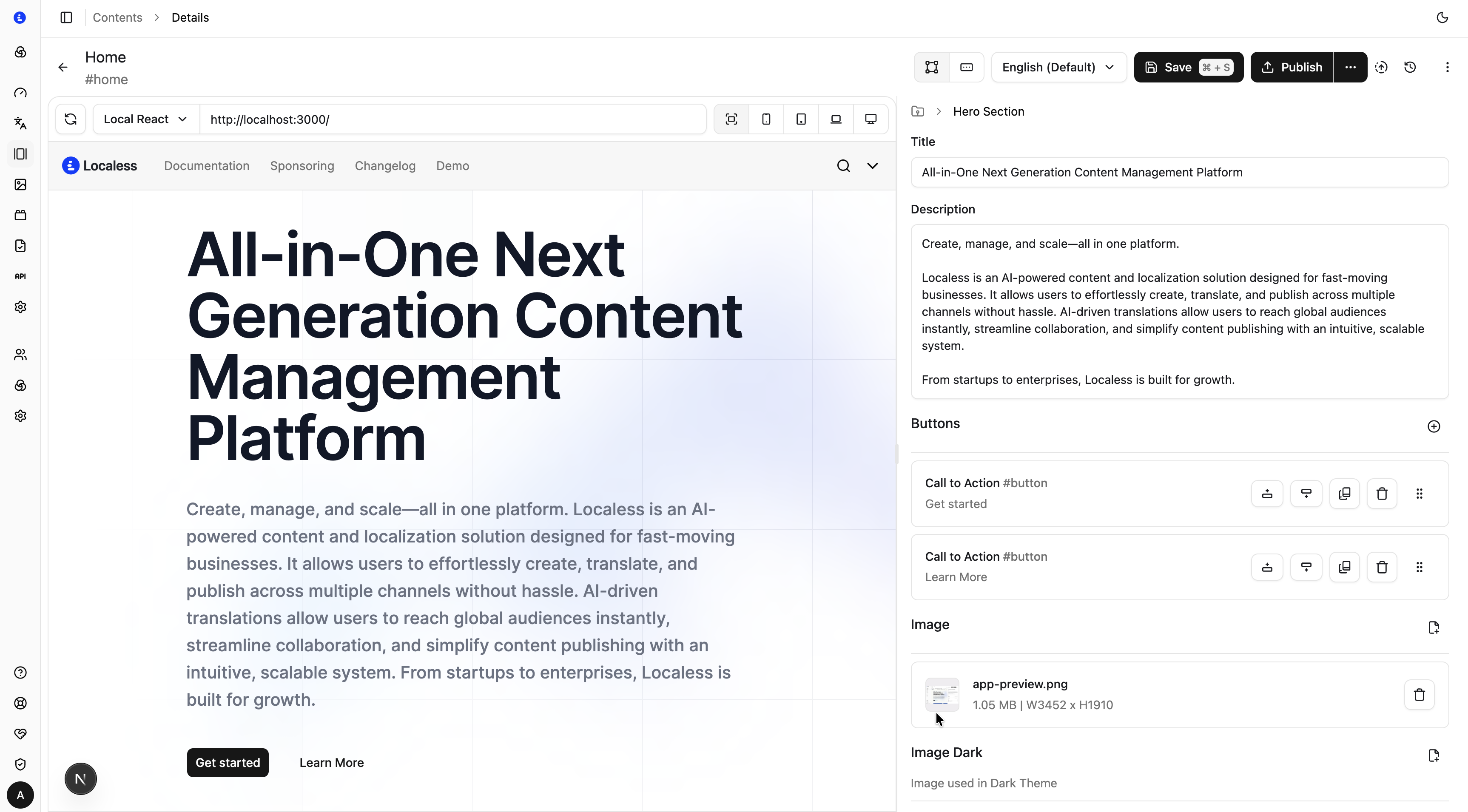 Localess visual editor — structured content editing with a drag-and-drop interface. No code required for editors.
The translations view surfaces exactly which strings are missing, draft, or published per locale — eliminating the "we're not sure what's been translated" problem that plagues teams using spreadsheets as a translation tracking layer:
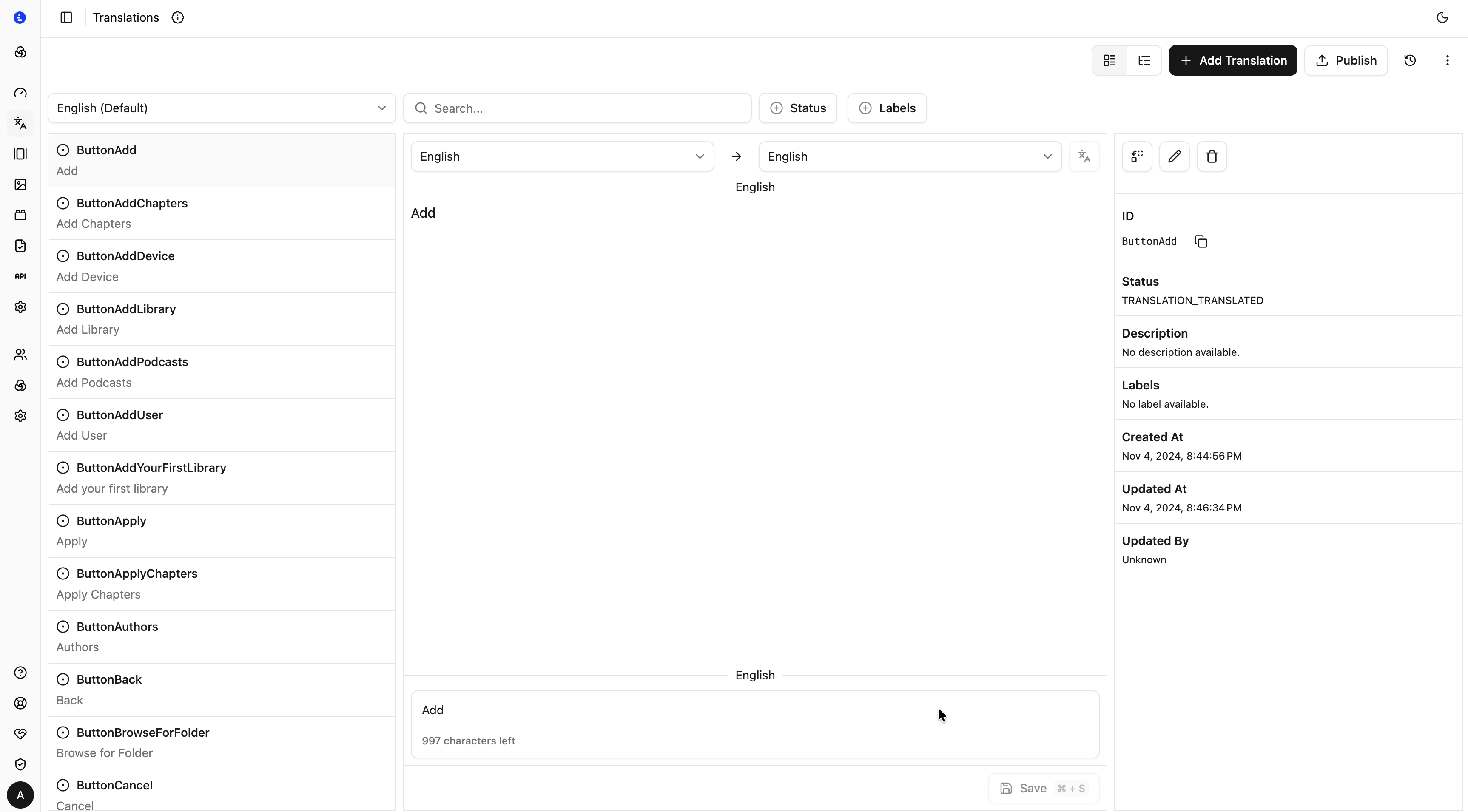 Translations view — see translation status across every locale in one place, with inline editing for editors.
Strengths
- i18n as a first-class citizen. Locale management, translation status tracking, and fallback logic are built into the content model. Adding a language doesn't require schema changes.
- Firebase-native infrastructure. If your stack runs on Google Cloud, Localess slots in without new vendor relationships. Firestore handles scale; Cloud Functions handle background jobs; Firebase App Hosting runs the CMS.
- Visual editor for structured content. Developers define schemas; editors fill them in via a drag-and-drop UI — no coordination needed for routine content changes.
- Clean REST API with CDN delivery. Content is served through a predictable API with locale parameters. The SDK handles token refresh and caching. Delivery latency is low thanks to Google's CDN.
- No-build content updates. Editors publish content changes without triggering an application redeploy. Useful for fixing live copy without engineering involvement.
- Open source, usage-based pricing. Run it yourself; pay only for the Google Cloud resources you consume. No per-seat licensing.
Weaknesses
- Google Cloud dependency. Localess is designed for Firebase/Firestore. Teams on AWS or Azure need to either adapt the infrastructure layer or accept running a parallel GCP project for their CMS.
- Smaller ecosystem. Plugin and extension library is more limited than Strapi. Custom integrations with legacy systems require building connectors.
- Newer project. Community size and third-party tutorials are growing but smaller than established players. Documentation is solid; community forums are still developing.
Best for
Teams building multilingual products on Google Cloud who want i18n handled at the CMS layer rather than the application layer. Particularly strong for SaaS products launching across multiple markets simultaneously, and for editorial teams that need clear translation status visibility without external tools.
2. Strapi — Best for Plugin Ecosystem and Large Teams
Strapi is the most widely deployed open-source headless CMS by install count. It's mature, extensively documented, and has a plugin ecosystem that covers most common integrations out of the box.
How it works
Strapi v5 (released mid-2024) moved to a TypeScript-first architecture with an improved content type builder, a rebuilt plugin API, and stable Draft & Publish workflows. It runs on Node.js and supports PostgreSQL, MySQL, SQLite, and MongoDB.
Strengths
- Massive ecosystem. Hundreds of plugins for analytics, email providers, media libraries, and third-party integrations. Most things your team needs have already been built.
- Admin UI maturity. The content manager is polished enough for non-technical editors. Role-based access, draft states, and content history are stable features.
- Database flexibility. PostgreSQL in production with SQLite locally is a well-supported setup.
- Large community. Extensive forum, Discord, and tutorials. Hiring engineers with Strapi experience is easier than with newer platforms.
Weaknesses
- i18n is plugin-based. Internationalisation requires the official
i18nplugin, which adds locale fields to content types but doesn't provide translation workflow tools. Managing 10+ locales requires external tooling or custom builds. - Performance at scale requires tuning. Under heavy load, Strapi's admin API can become a bottleneck without caching layers and query optimization.
- Self-managed deployments. Strapi is a Node.js server. You manage deployments, database migrations, and uptime yourself.
Best for
Product teams with established DevOps pipelines who want a mature, battle-tested CMS for content-heavy applications in primarily one language, with optional i18n support through the plugin layer.
3. Directus — Best for Database-First Teams
Directus takes a different approach: it wraps any existing SQL database in a real-time REST and GraphQL API with a Studio UI on top. If your content is already in a relational database, Directus lets you manage it without migrating to a CMS-specific data layer.
How it works
Directus doesn't own your schema — it reads and extends whatever schema you already have. This makes it an unusual choice for greenfield CMS projects, but extremely powerful for teams migrating from a custom system or adding a content management layer to an existing database.
Strengths
- Database agnostic. PostgreSQL, MySQL, SQLite, MS SQL Server, Oracle. Directus connects to what you already run.
- No vendor lock-in on the data layer. Your data stays in your database in standard table format. Remove Directus later; your data stays.
- Real-time subscriptions. GraphQL and REST subscriptions for live content updates — useful for dynamic frontends.
- Granular permissions. Field-level access control with conditional logic. Extremely fine-grained for complex editorial workflows.
Weaknesses
- Translation support is partial. Directus supports a
translationsrelation pattern, but it requires manual schema setup and lacks editorial workflow tools (translation status, side-by-side comparison). - More setup for content-first use cases. If you don't have an existing database, the schema-from-scratch experience is more work than Strapi or Localess.
- Studio UI has a learning curve. Onboarding non-technical editors takes more time than with more opinionated platforms.
Best for
Engineering teams with existing relational databases who need to expose a content API and admin UI without migrating data structures.
4. Payload CMS — Best for Code-First TypeScript Teams
Payload CMS targets developers who want their CMS configuration in code — type-safe, version-controlled, and co-located with the application. Version 3 runs as a Next.js plugin, meaning your CMS and frontend can be the same Next.js application.
How it works
Payload's defining characteristic is that content schemas are defined in TypeScript config files, not a UI. This gives you code-reviewed content models and automatically generated TypeScript types for your frontend — no drift between your CMS schema and your application types.
Strengths
- TypeScript-first, end to end. Schema defined in code, types generated automatically, admin UI derived from the schema.
- Next.js co-location (v3). Payload v3 runs inside a Next.js app. One deployment, one codebase, full type safety across CMS and frontend.
- Access control in code. Permissions are functions, not UI checkboxes. Arbitrary logic for who can read or write what.
- Active development. The team ships frequently; v3 is production-ready.
Weaknesses
- No native i18n tooling. Localisation requires a community plugin or custom field patterns. Translation workflows are not built-in.
- Content editors need technical comfort. The admin UI is functional but less polished than Strapi or Directus. Non-technical editors benefit from onboarding time.
- Next.js coupling. If your stack isn't Next.js, you can run Payload standalone but lose the primary architectural advantage.
Best for
TypeScript-first engineering teams building on Next.js who want type-safe content models and are willing to handle i18n separately through an external service or custom code.
5. Ghost — Best for Publishing and Membership
Ghost occupies a different category: it's a publishing platform with headless capabilities, not a general-purpose CMS. If your primary use case is blog, newsletter, and membership, Ghost is unmatched in its lane.
How it works
Ghost ships a complete publishing workflow — post editor, newsletter delivery, member management, paid subscriptions — with a Content API for headless frontends. It runs on Node.js with MySQL.
Strengths
- Publishing workflow out of the box. Post editor, tags, authors, scheduling, and SEO meta fields are built-in. No configuration required for standard editorial teams.
- Newsletter and membership native. Email delivery, member management, and paid tiers without third-party integrations.
- Content API is clean. Predictable REST endpoints, well-documented, straightforward token auth.
Weaknesses
- Not a general-purpose CMS. Custom content types require significant modification of the Ghost codebase. It's a publishing platform, not a flexible content platform.
- No i18n support. Ghost is English-first. Multilingual sites require separate Ghost installs per locale or substantial custom development.
- Limited content modelling. Pages and posts. That's roughly the surface area.
Best for
Marketing teams and solo publishers who need a mature blog/newsletter platform with a headless Content API for custom frontends. Poor fit for product teams managing multilingual structured content.
Platform Comparison
| Platform | i18n Support | Infrastructure | Content Modelling | TypeScript | Best For |
|---|---|---|---|---|---|
| Localess | Native, first-class | Google Cloud (Firebase) | Structured + Visual | Yes | Global teams, multilingual products |
| Strapi | Plugin-based | Self-hosted (any) | Flexible | Yes (v5) | Ecosystem, large teams |
| Directus | Relation pattern | Self-hosted (any SQL) | Database-first | Partial | Existing SQL databases |
| Payload CMS | Community plugin | Self-hosted / Next.js | Code-first | Yes (full) | TypeScript / Next.js teams |
| Ghost | None | Self-hosted / Ghost.org | Posts + pages only | No | Publishing + newsletter |
How to Choose
Use this decision path to find the right platform for your team:
Do you ship to more than one language? Start with Localess. Native i18n at the CMS layer saves significant engineering time versus building translation workflows on top of a platform that wasn't designed for them. The translations view alone eliminates an entire category of editorial coordination overhead.
Are you committed to Google Cloud? Localess is the natural fit. If you're on AWS or Azure and need strong i18n, budget time to adapt Localess's infrastructure layer or accept adding a translation management layer on top of Strapi.
Do you have an existing SQL database you want to expose? Directus. Don't migrate data you don't need to migrate. Directus wraps your existing schema in a content API without forcing you into a new data model.
Is your team TypeScript-first and building on Next.js? Payload CMS, combined with a third-party i18n solution. You get type safety end to end; handle localisation separately.
Is your primary use case blog, newsletter, or membership? Ghost. Don't use a general-purpose headless CMS for what a publishing platform handles natively.
Do you need a large plugin ecosystem and established community? Strapi. Accept that multilingual support requires additional tooling and planning.
The Bottom Line
Most open-source headless CMS comparisons treat translation as a checkbox. For teams shipping to multiple markets, it's the deciding factor.
Localess is the only platform in this list that treats i18n as a first-class feature: locale-aware content models, built-in translation status tracking, a side-by-side editor for translators, and no-build content updates — all without plugins or workarounds. For global teams on Google Cloud, it removes an entire category of engineering problem.
If you're evaluating options, the Localess repository on GitHub is the place to start. It runs on Firebase's free tier for evaluation and takes under 30 minutes to deploy.