Thought leadership / pain-point article
Translation Without the Spreadsheet. How Modern Teams Manage Multilingual Content.
Spreadsheets break multilingual content management at scale. Learn how modern teams replace translation chaos with real-time CMS workflows — and ship faster.
Imagine it is a Monday morning. Your product just launched in three new markets. The marketing team needs 40 landing-page strings updated for the German localisation. The French translator emailed a revised file on Friday. And somewhere — no one is quite sure where — there is a spreadsheet. Possibly several.
This is the multilingual content management problem that content managers, marketing managers, and product managers at global companies deal with every week. The spreadsheet became the default tool for managing translations because it was available, flexible, and required no setup. It became the default problem for the same reasons.
Why Spreadsheets Break at Scale
Spreadsheets were built for numbers and lightweight data — not for managing translation workflows across languages, markets, products, and teams. They fail in predictable ways, and if you have been in a localisation project for longer than six months, you have seen at least one of these.
1. Version control is manual and fragile
The working translation file is always somewhere. The question is: which version? strings_FR_v3_FINAL.xlsx, strings_FR_v3_FINAL_2.xlsx, strings_FR_ACTUALLY_FINAL.xlsx. Each file is a fork. Every handoff creates another branch that someone will reconcile — or not. By the time you ship, you cannot be certain your translators worked from the latest source.
2. Handoff delays compound across languages
Translation requests go out by email. Translators download a file, work locally, and email it back. That turnaround takes days. When you are managing five languages, those delays do not add — they multiply. A product launch that needed two weeks of localisation turns into six weeks of logistics.
3. Out-of-sync strings surface live errors
Source content changes while translations are in flight. A button label gets renamed. A policy line gets updated. The spreadsheet that left your desk last Tuesday does not know about any of that. The result: translated copy that refers to a feature or UI element that no longer exists, shown to real users in real markets.
4. No one knows what is done
Without a translation management system, "what is the status of the French translation?" is a question with no good answer. You ping the translator. You scan the email thread. You open five files. The answer arrives fifteen minutes later and may still be wrong. There is no source of truth — only the last person who replied.
5. Reuse is invisible, so you pay twice
If the same string — a privacy notice, a call-to-action, a standard error message — appears in ten places across your product, a spreadsheet-driven workflow translates it ten times. Every update requires ten edits across however many files contain it. There is no translation memory; there is only repetition and the cost that comes with it.
What a Modern Translation Workflow Actually Looks Like
The shift away from spreadsheets is not about adding more tools — it is about moving translation into the same content system your product already runs on.
In a modern content localisation workflow:
- Source strings live in one place and are versioned automatically.
- Translators work directly in the platform, with no file download or upload cycle.
- Translation status is visible in real time: pending, in progress, reviewed, published.
- AI-assisted translation handles first-pass drafts so translators edit rather than start from a blank page.
- Published content goes live without a build step — no ticket, no deploy queue.
The outcome is not just faster localisation. It is localisation that holds together when something changes.
The Features That Actually Matter
Most content managers looking to replace spreadsheet translations do not need a long feature list — they need a short list of problems solved. These are the ones worth checking.
Translation status tracking
You need to know, at a glance, which strings are done, which are in progress, and which have not been started. Not from an email thread — from the platform itself. A clear status model (DRAFT → IN PROGRESS → REVIEWED → PUBLISHED) gives translators, reviewers, and managers a shared view without ceremony.
Translation memory and reuse
Translation memory stores previously approved translations and surfaces them automatically when the same string appears again. This cuts cost, shortens turnaround, and keeps terminology consistent across markets. It matters most for legal copy, product terminology, and UI labels that repeat throughout a product.
AI-powered first-pass translation
AI translation tools — Google Translate integration being the most accessible — do not replace human translators. They give translators a working draft to refine rather than a blank page to fill. For most content, this reduces active translation time substantially. For high-volume content like product catalogues or help articles, the compounding effect over a year is significant.
No-build publishing
If publishing a translation update requires a developer to merge a pull request and wait for CI, you have added a hard dependency to every single content change. The right workflow lets content managers publish translated strings directly — no ticket, no queue, no waiting. This is what turns localisation from a monthly release event into a continuous content process.
How Localess Handles This
Localess is built around a translations view that replaces the spreadsheet workflow with something content managers can actually operate.
Strings are stored centrally and organised by project. Each string carries a status that updates as translators work, and translation memory surfaces reuse candidates automatically. Google Translate integration provides AI-powered first-pass drafts for any supported language. When a translation is ready, it publishes instantly — no build, no deploy, no developer required.
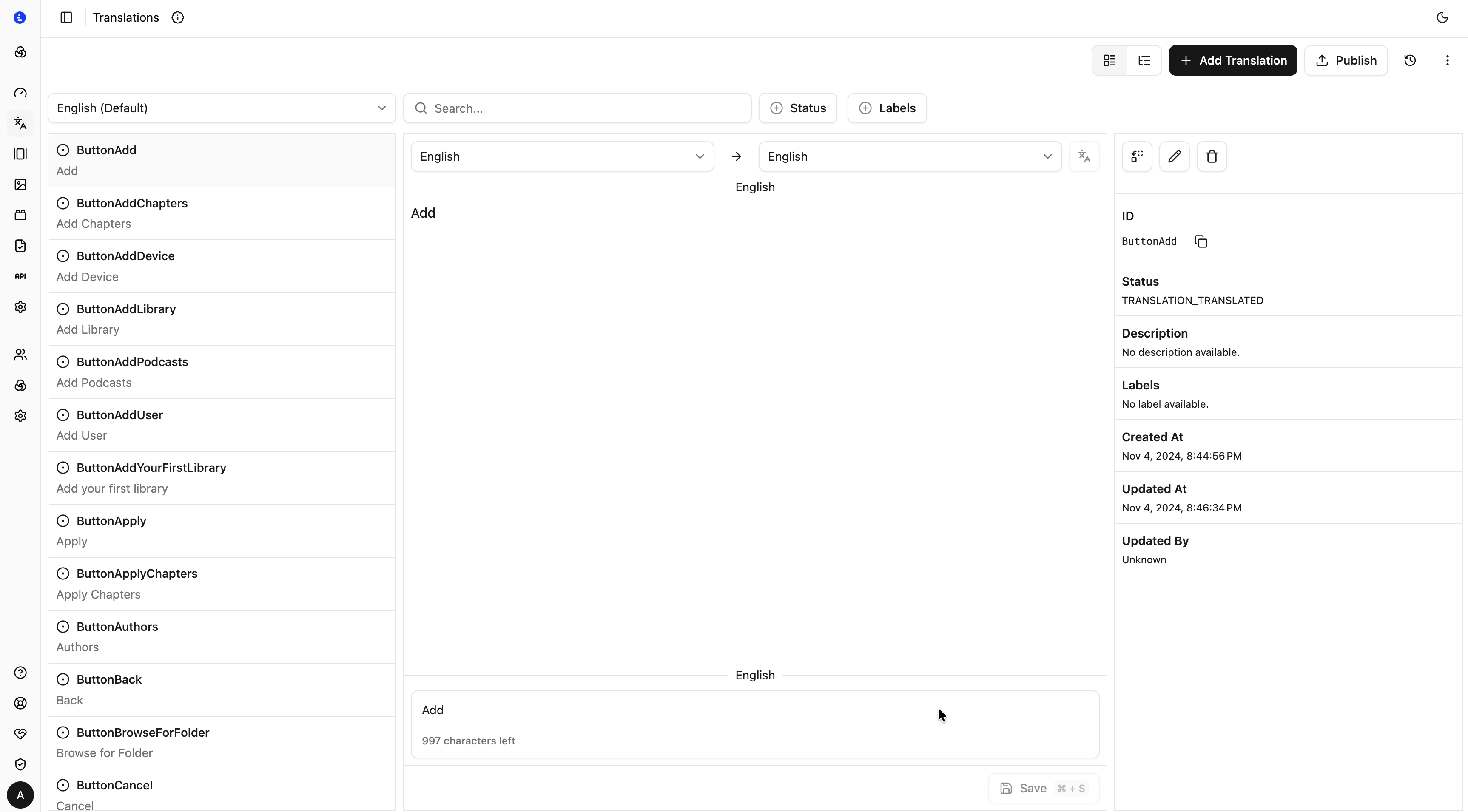
The translations interface is designed for non-technical users. You do not need to understand JSON keys or i18n file formats. You see strings, statuses, and language columns. Add a language, fill in translations (or run AI-assisted translation for a first pass), mark strings reviewed, and publish. The workflow fits the way content teams already think about their work.
For teams managing content in three or more languages, this compounds. New strings arrive from developers, get translated in Localess, and go live — without any email thread, any spreadsheet, and any delay waiting on a release window.
Getting Started Without Developer Involvement
This is the question content managers ask most: how much developer time does this actually require?
The initial Localess setup is a developer task — the SDK integration connects your product's i18n layer to Localess. For most teams, that is a few hours of work. After that, content managers own translation management end-to-end: adding languages, updating strings, managing translators, reviewing copy, and publishing.
Day-to-day translation work requires no developer involvement. That separation — developers configure, content managers operate — is the model Localess is built on. It is also the model that makes localisation scale without adding engineering headcount.
The Spreadsheet Had a Good Run
The translation spreadsheet solved a real problem when it emerged: how do you coordinate a large content set across teams without dedicated tooling? It worked until the product grew, the team grew, and the markets multiplied. Then it became the problem.
Content localisation workflow belongs in a purpose-built system — one that speaks the language of content managers, not just developers. Where translation status is visible, reuse is automatic, and publishing does not require a ticket.
Ready to retire the spreadsheet? Start with Localess and see what multilingual content management looks like when the workflow fits the work.