
Content
Author and manage structured content documents organised in folders — each document follows a Schema and is available via the API in one or more locales.
Content in Localess is made up of Documents and Folders. A Document holds the actual content data, shaped by a Schema of type ROOT. Folders let you organise documents into a hierarchy that maps directly to URL slugs. Both are available via the API and the SDKs.
Main Screen
Navigate to Content from the side menu. The screen shows all folders and documents in the current location, with folders listed first.
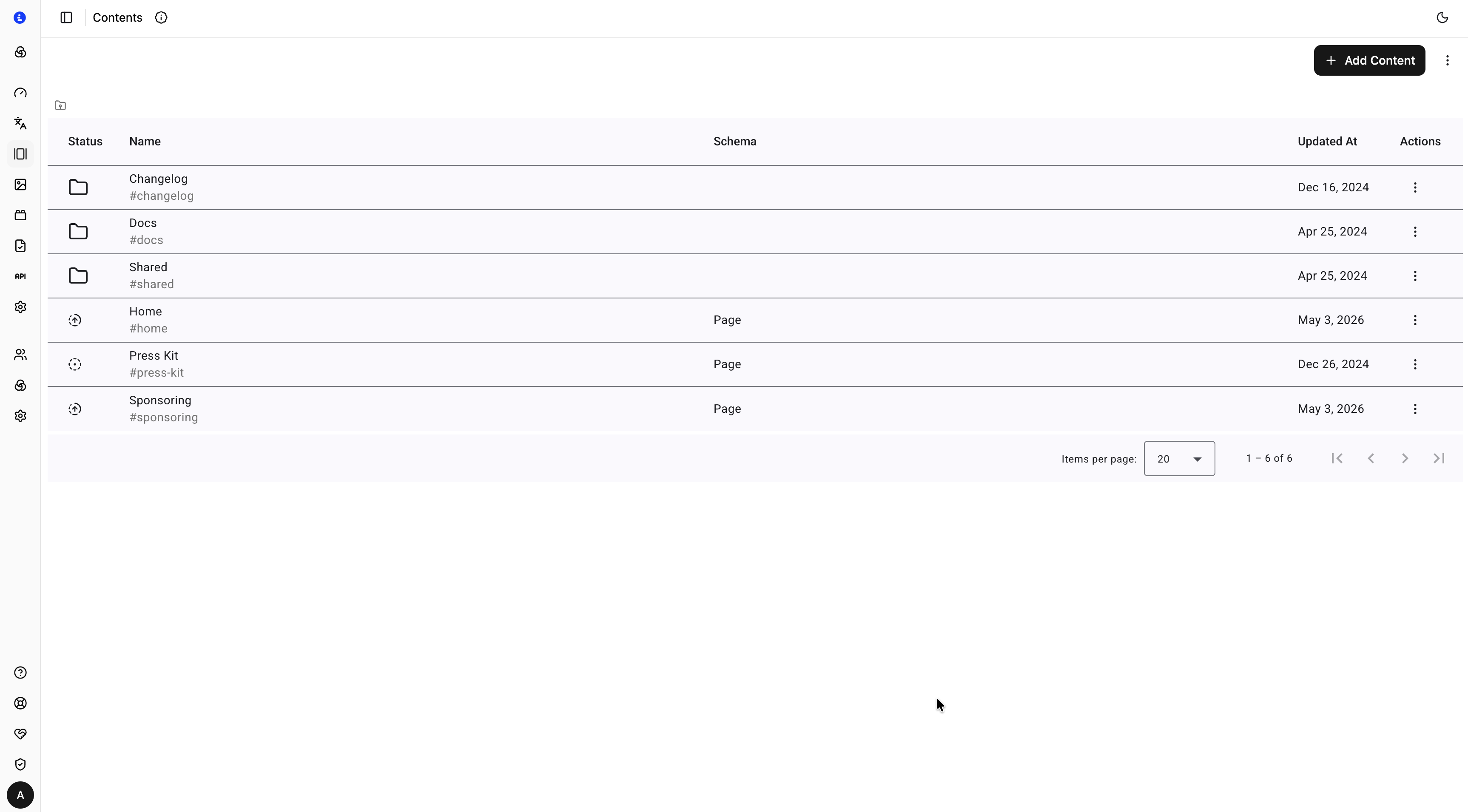
The list has the following columns:
| Column | Description |
|---|---|
| Status | Publish state of the document — solid icon means published, dashed icon means unpublished |
| Name | Display name with the slug shown beneath in muted text (e.g. #home) |
| Schema | The ROOT schema this document uses. Empty for folders |
| Updated At | Timestamp of the last saved change |
| Actions | Three-dot menu for edit, duplicate, and delete |
Navigation
The breadcrumb bar at the top of the list shows your current position in the folder tree. Click any segment to navigate back up, or click a folder row to enter it.
Toolbar
| Action | Description |
|---|---|
| + Add Content → Document | Create a new content document in the current folder |
| + Add Content → Folder | Create a new folder in the current location |
Add Folder
| Field | Required | Description |
|---|---|---|
| Name | ✅ | Display name shown in the content list |
| Slug | ✅ | URL-safe identifier for this folder (e.g. blog). Combined with parent slugs to form the full path |
Add Document
| Field | Required | Description |
|---|---|---|
| Name | ✅ | Display name shown in the content list |
| Slug | ✅ | URL-safe identifier for this document (e.g. home). Combined with parent slugs to form the full path |
| Schema | ✅ | The ROOT schema that defines the shape of this document's fields |
Slug System
Every folder and document has three slug-related fields:
| Field | Description | Example |
|---|---|---|
slug | The identifier for this item alone | my-post |
parentSlug | The full path of the containing folder | blog |
fullSlug | The complete path used to fetch content via the API | blog/my-post |
Use fullSlug as the value passed to getContentBySlug() in the SDK or API.
Document Editor
Click any document row to open it in the editor. The editor is split into two panels:
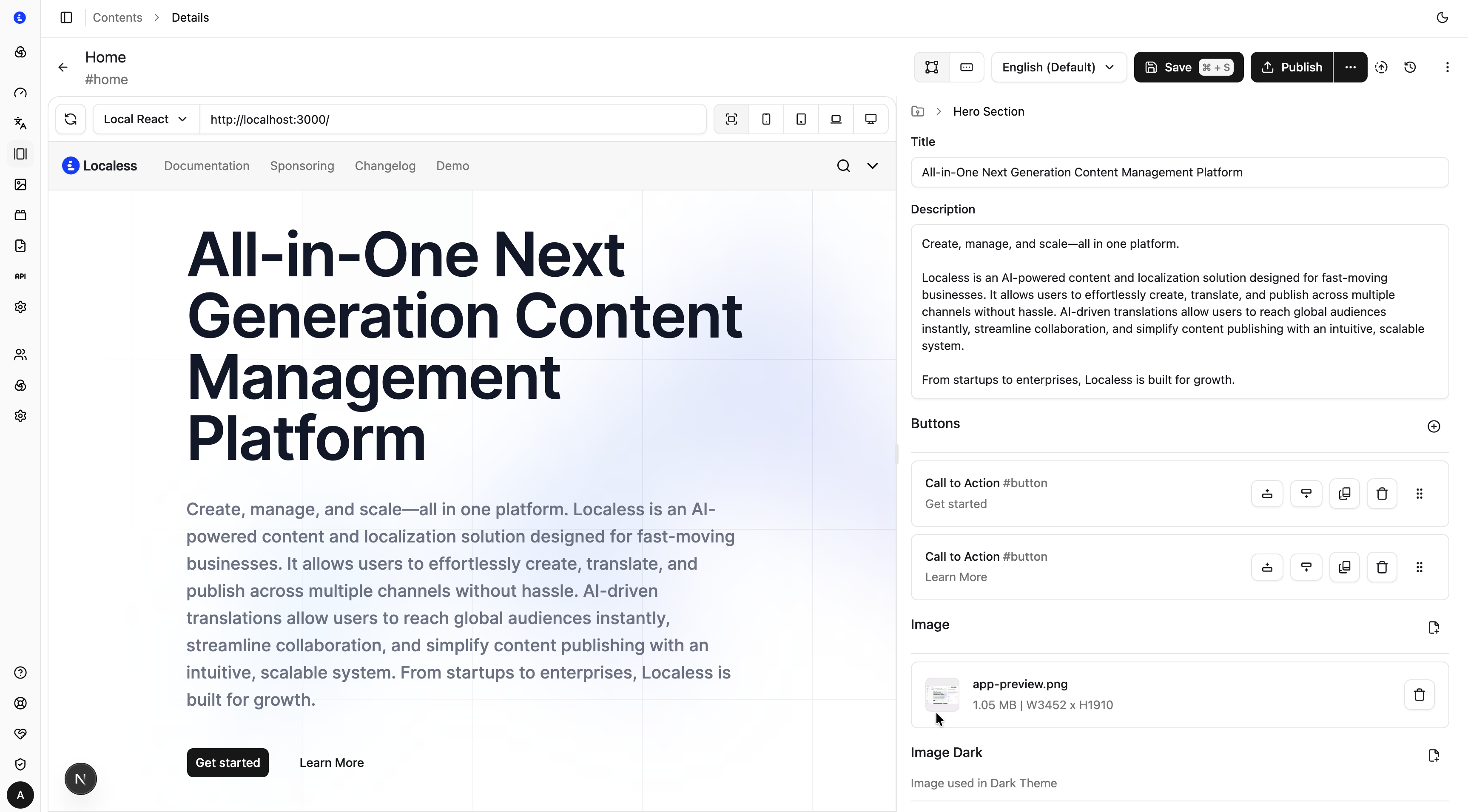
Left panel — Visual Editor preview
When a frontend application is connected to the Localess Visual Editor, the left panel shows a live iframe preview of the rendered page. Changes made in the form on the right are reflected in the preview in real time.
See Visual Editor for setup instructions.
Right panel — Schema form
The right panel renders all fields defined in the document's ROOT schema as an editable form. Field types — text, rich text, arrays, asset pickers, nested blocks — are rendered according to the schema definition.
At the top of the right panel:
| Control | Description |
|---|---|
| Locale dropdown | Select the locale being edited. Each locale's values are stored independently |
| Save | Save the current locale's changes as a draft. A dot indicator appears when there are unsaved changes |
| Publish | Promote all saved changes to the published version |
The form is validated in real time against the selected schema and locale. On save, all schema constraints across all locales are checked.
Save vs Publish
Content follows a two-state model:
| State | How to access via API |
|---|---|
| Saved (draft) | Available immediately with version=draft |
| Published | Available without specifying a version |
This lets you author and preview content before making it available to production consumers.
Edit Document Properties
To rename a document or change its slug after creation, use the Actions menu (three-dot icon) on the content list row. Changes to a slug will update the fullSlug of the document and all its children.
Fetching Content
Use the TypeScript SDK or REST API to fetch content at runtime:
// Fetch by full slug
const content = await client.getContentBySlug<Page>('blog/my-post', {
  locale: 'en',
  resolveReference: true,
  resolveLink: true,
});

// Fetch by document ID
const content = await client.getContentById<Page>('abc123', { locale: 'en' });
See Schemas for how to define the fields that appear in the document editor, and CLI for generating TypeScript types from your schemas.